- Introduction
- Design: A Premium Look and Feel
- Keyboard and Trackpad: Comfort Meets Functionality
- Ports and Connectivity: Versatile Options for Creatives
- Display: A Visual Delight
- Performance: Powering Through Tasks
- Battery Life: All-Day Performance
- Software: Enhanced Productivity Features
- Final Thoughts: Is the ASUS ZenBook S16 Worth It?
- What Do You Think?
Introduction
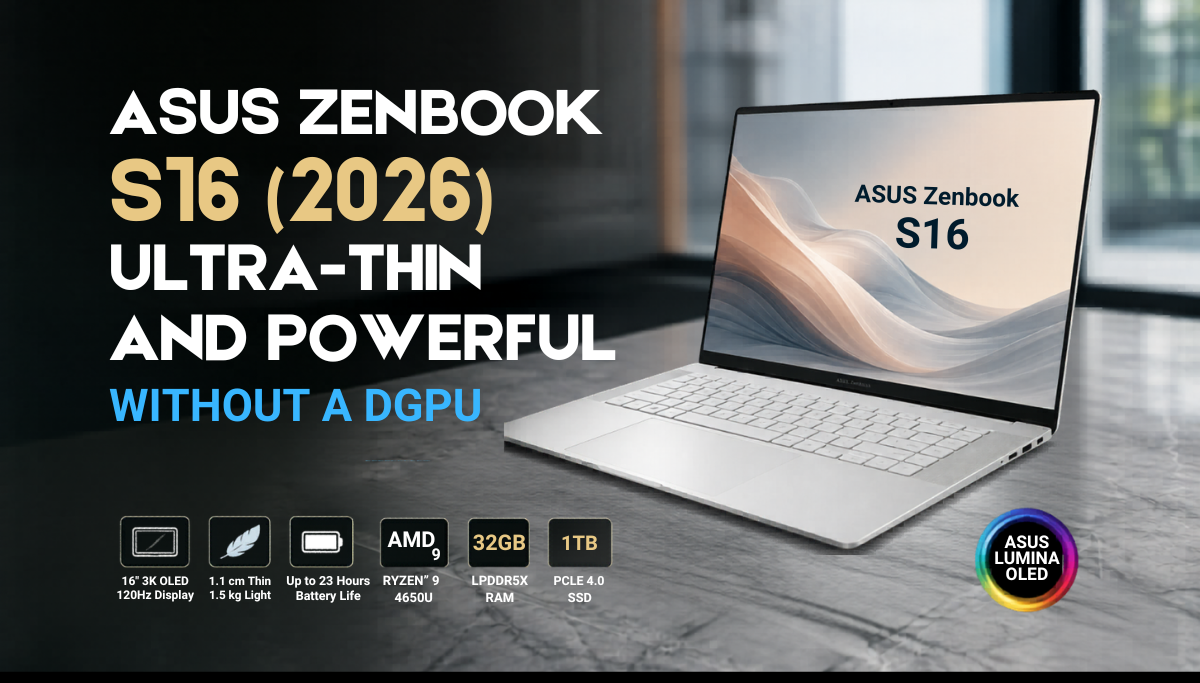
The ASUS Zenbook S16 (2026): Ultra Thin and Powerful without dGPU. Lineup has been a staple in the world of Windows laptops for over a decade, catering to professionals and students alike who seek a blend of performance and portability. In this review, we dive deep into the 2026ASUS ZenBook S16 (UM5606GA) to see if it continues to uphold the legacy of its predecessors. With a sleek design, powerful internals, and a stunning display, is the ZenBook S16 the right choice for you? Let’s find out!
Design: A Premium Look and Feel
The first thing that strikes you about the 2026 ASUS ZenBook S16 is its redesigned lid. Gone are the long lines of previous models, replaced by a cleaner, more professional aesthetic. The Scandinavian white color adds to its premium feel, although some may miss the unique design cues of earlier models.
- Material: The ZenBook S16 is crafted from a durable ceramic material that is both lightweight and resistant to smudges.
- Dimensions: Measuring just 1.1 cm thick and weighing only 1.5 kg, it’s easy to carry around, making it ideal for on-the-go professionals.
- Build Quality: The all-metal construction ensures durability without compromising on style.
Keyboard and Trackpad: Comfort Meets Functionality
Opening the ZenBook S16 reveals a spacious keyboard and a large glass trackpad. While the keyboard isn’t full-sized, it offers a comfortable typing experience with decent travel and quiet keys, making it suitable for crowded environments.
- Keyboard Layout: The layout provides ample space for hand placement, although a numpad would have been a welcome addition.
- Trackpad: The trackpad is smooth, responsive, and supports multi-touch gestures, enhancing productivity.
- Palm Rejection: Excellent palm rejection ensures that your typing experience remains uninterrupted.
Ports and Connectivity: Versatile Options for Creatives
Despite its slim profile, the ZenBook S16 is equipped with a variety of ports that cater to different needs:
- Two USB Type-C 4.0 Gen 3 ports (with power delivery and display out)
- HDMI 2.1 port
- 3.5 mm audio jack
- USB A 3.0 port
- Full-size SD card reader
This selection is particularly beneficial for creatives who often work with SD cards, eliminating the need for additional dongles. However, users of microSD cards may need to invest in an adapter.
Display: A Visual Delight
The 16-inch ASUS Lumina OLED panel is undoubtedly one of the standout features of the ZenBook S16. With a 3K resolution and a 120 Hz refresh rate, it offers stunning visuals that are perfect for both work and entertainment.
- Brightness: The display boasts a maximum HDR peak brightness of 1,000 nits, making it usable even in bright outdoor settings.
- Color Accuracy: The OLED technology ensures vibrant colors and deep blacks, enhancing the viewing experience for movies and games.
- Viewing Angles: Excellent viewing angles mean that color shifts are minimal, even from extreme angles.
Whether you’re editing photos or binge-watching your favorite series, the ZenBook S16’s display will not disappoint.
Performance: Powering Through Tasks
Under the hood, the ZenBook S16: Ultra Thin and Powerful without dGPU is powered by an AMD Ryzen 9 4650U processor, coupled with 32 GB of RAM and a 1 TB SSD. This configuration ensures that the laptop can handle a variety of tasks with ease.
- Multitasking: The laptop excels at multitasking, allowing users to run multiple applications simultaneously without lag.
- Creative Work: Editing in software like Photoshop and Lightroom is smooth, with quick export times for photos and videos.
- Gaming: While not a dedicated gaming laptop, it can handle lighter titles like Genshin Impact on medium settings.
However, it’s important to manage expectations regarding gaming performance, as the integrated AMD Radeon 880M GPU may struggle with more demanding titles.
Battery Life: All-Day Performance
One of the most impressive aspects of the ZenBook S16 is its battery life. With an 82 Wh battery, ASUS claims up to 23 hours of use, and our tests suggest this is a realistic figure.
- Real-World Usage: After a full day of productivity tasks, the battery still had around 70% remaining.
- Charging Options: The laptop can be charged via any USB-C port, allowing for flexibility with power banks.
- Charging Speed: While the maximum charging rate is 68 W, it’s sufficient for quick top-ups during the day.
Software: Enhanced Productivity Features
The ZenBook S16 comes pre-installed with Windows 11 and features Microsoft Copilot, which can be quickly accessed via a dedicated button on the keyboard. This integration enhances productivity by providing AI assistance for various tasks.
- Pre-Installed Apps: ASUS Zenbook includes several useful applications, such as MyASUS, Screen Expert, and GlideX, to streamline your workflow.
- Microsoft Office Home 2024: Comes preinstalled, ready for work right out of the box.
Final Thoughts: Is the ASUS ZenBook S16 Worth It?
The 2026 ASUS ZenBook S16 is a remarkable laptop that balances performance, design, and portability. While it may not be the best choice for hardcore gamers, it excels in productivity and creative tasks, making it a solid option for professionals and students alike.
However, the price point is something to consider. At the time of this review, it retails for approximately 134,995 pesos on the ASUS ZenBook S16. If you’re currently using a relatively new laptop, it may not be worth upgrading just yet. But for those in need of a capable machine for work and light gaming, the ZenBook S16 is a fantastic choice.
What Do You Think?
What are your thoughts on the new ASUS ZenBook S16? Would you consider upgrading to this model, or do you have your eyes set on a different laptop? Share your thoughts in the comments below!
If you found this review informative, please drop a like and subscribe to our channel for more tech reviews. Don’t forget to follow us on our social media platforms: